How to Update Old Blog Posts in WordPress: Which Ones, What to Change, and What Never to Touch
How to update old blog posts in WordPress, in one sentence: sort first, rewrite last. Read Search Console before you open a single post, put each one in one of four buckets, keep the URL and slug exactly as they are, replace what is outdated, and republish with the original date still visible next to the updated one.
On 2026-09-02, on Google.com in the US, this question returned an AI Overview citing five sources above every blue link. The first organic result sat at position 4, and explained how to convert Classic posts to Gutenberg. The next sat at position 14. Changing the format of a stale post does not make it less stale.
Which old posts are worth updating (and which are not)
Before you update old blog posts, you need to know which ones. That answer is in data you already have.
Start from Search Console, not from the post list
Your post list is sorted by date, and a post's date says nothing about whether it deserves your afternoon. Search Console says plenty. Three signals set the order of work: impressions that hold while clicks fall, an average position sliding over months rather than weeks, and queries that have changed meaning since you published. Google's own AI Overview on this query cites Search Console among its sources. Open the report first, the post second.
The four buckets
Search Console already reports three numbers for each page: clicks, impressions and average position. Read together over twelve months, they put every post in one of four buckets.
| Bucket | Search Console signal | What to do | Where it leads |
|---|---|---|---|
| High traffic: refresh carefully | Clicks steady, position holding | Correct facts, keep the structure | Keep and watch |
| Declining traffic: update | Impressions hold, clicks fall | Intent, facts, links | The work below |
| No traffic, still relevant: consolidate or relink | Impressions, almost no clicks | Merge, or link forward | Consolidation |
| No traffic, no value: noindex or delete | Neither, over a year | Noindex, read one by one | A separate call |
Be firm about the last bucket: do not automate deletions, read them one by one. When two posts split one query, that is cannibalization, and folding the weaker into the stronger beats rewriting either. Choosing between the last two buckets is its own decision: prune or refresh.
Here is the part most guides skip: on a backlog of several thousand posts, value sits in the sorting, not the rewriting. Refreshing at random costs more than doing nothing.
What a spreadsheet misses
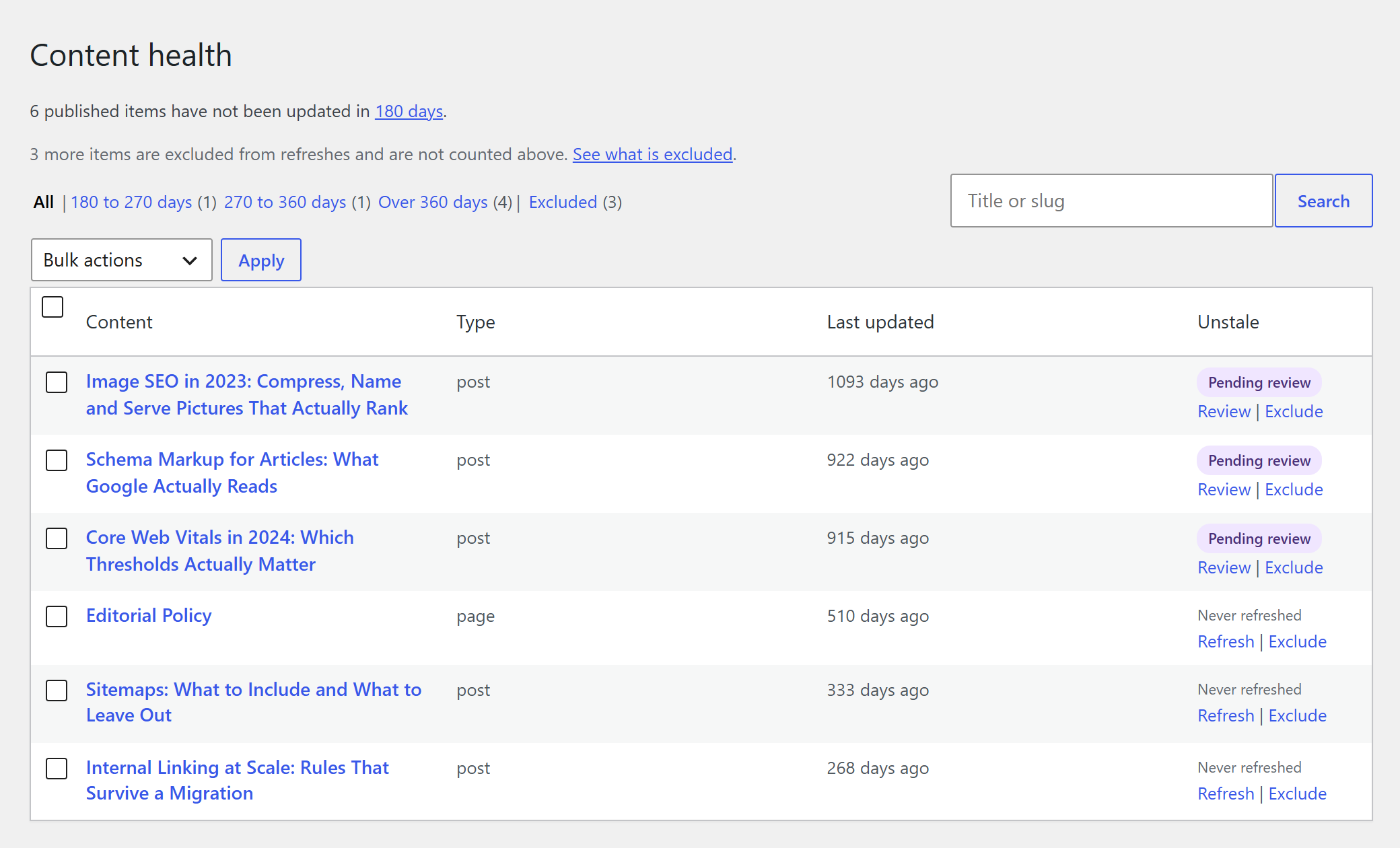
The method people actually describe: crawl the site, export Search Console over the longest period available, pull a year of GA4 sessions, and merge the three in a spreadsheet with VLOOKUP. It works, with one structural blind spot: those tools only know pages that were clicked. Posts that bring nothing never enter the sheet, which is exactly what buckets three and four are made of. A tool that lives inside WordPress sees every published post instead. The Content health screen in the free plugin sorts them all by staleness, in three bands derived from the threshold you set, and queues up to 50 at a time, so the sorting happens before you update an old post, not after. The full method is its own guide: find outdated content on your site.
Why an old post loses traffic, and how to see it coming
A post rarely drops because of one event. It drifts, and there are three causes you can verify yourself in an afternoon.
The query changed meaning. What people expect behind those words in 2026 is not what they expected the year you published, and your post still answers the old question. A competitor published something fresher, and it is not always better, only more current. And the figures in your article have been wrong for two years, which readers notice faster than any algorithm does.
The phenomenon has a name: content decay, the slow loss of search visibility on a page nobody touched.
The early warning is not the click curve. By the time clicks fall, the position has already gone. Watch impressions instead: a page that still surfaces but surfaces lower will show it there first, well before the traffic report makes it obvious. That is the signal worth a monthly look, and it is the one that tells you to update an old post before it disappears from the report entirely.
What never to touch: the URL, the slug, and the links pointing at it
Five things you never do to a post that ranks, whatever else you change.
- Never change the URL or the slug.
- Never rewrite the whole thing from scratch.
- Never take the post offline, or noindex it, while you work on it.
- Never automate deletions, on any bucket.
- Never strip out the sections that already answer the query directly.
The URL rule is the one people ask about, and the reason is simple. A backlink points at an address, not at a version of the text. Rewrite every paragraph and the links keep pointing where they pointed, with the same anchors and the same equity. Change the address and every one of them needs a redirect: WordPress adds one for a published post's old slug, not for a page, a draft or a new post. Keep the same URL and there is nothing to fix.
The other four follow the same logic. A post that ranks holds a position that took years to earn, and each rule protects one part of it: the address, the text that earns the ranking, the continuity of indexing, and an archive you cannot get back. Taking a post offline while you work on it, even for a day, gambles the indexing for no gain at all.
If the URL genuinely has to change, and it almost never does when you update old blog posts, put a 301 redirect from the old address to the new one, permanently, and leave it in place. Forgetting that redirect is the classic way to lose years of accumulated links in an afternoon. A clean republish keeps the URL and the slug and leaves you a way back, and any tool that will not state that in writing does not get tested on a post that ranks. The full picture belongs to another page: republish without losing rankings.
Keep the original publish date visible: what Google actually says
Show both dates: the original publish date and the last updated date, clearly separated, and only move a date when the content behind it actually moved.
This is one of the rare points where Google has said something explicit and signed. In a Search Central Blog post dated 2019-03-11, John Mueller wrote, in the section of general best practices for dates on web pages:
"If you update a page significantly, also update the visible date (and time, if you display that). If desired, you can show two dates: when a page was originally published and when it was updated. Just do so in a way that's visually clear to your readers."
That post is more than seven years old, so read it as a dated official position rather than as current doctrine. The current documentation, "Influence your byline dates in Google Search" (last updated 2025-12-10, read on 2026-10-05), does not repeat that instruction. What it does say is that "our systems look at several factors" to estimate when a page was published or significantly updated, and that you can give a publication date, a last updated date, or both.
In practice that gives you three rules. Keep the original publish date visible, because it is part of what a reader uses to judge you. Display the updated date next to it, because that is the one that describes the text they are reading. And leave both alone for a typo fix: the visible date says the content moved, so move it when you update an old post in a way a reader would notice, and not before. Whether to change the publish date itself, rather than display both, is a longer question: changing the publish date.
What to change when you update old blog posts for SEO (and what is just hygiene)
Not every edit carries the same weight when you update old blog posts. Three of them decide whether the post recovers. The rest keeps it tidy, which is worth doing and worth doing second.
The three changes that move a post
Put it back in front of the query as it reads today. Search the query yourself and read the titles that rank now, not the ones that ranked the year you published. If the page answers a question people have stopped asking, no amount of polish will fix that. Fix the angle first.
Replace every stale number, date and fact. Outdated stats and facts are the most visible kind of decay, and the easiest for a reader to catch. Every figure gets checked against a current source, gets its current value, and carries that source. A price from 2022 in an article dated this month costs you more credibility than the missing update did.
Repair the links, in both directions. Broken outbound links go or get replaced, and a dead reference in a post you just updated reads worse than one in a post nobody touched. Then add links to whatever you have published since, which is a bigger opportunity than it sounds and gets its own section below.
The hygiene changes
The title tag and meta description are worth a pass once the body is right. The heading structure should match what the post now says. Images get alt text and a sensible size. And Classic posts can be converted to the block editor, which is exactly where the top of this SERP belongs: converting a post to Gutenberg makes it easier to edit, and does not make a single fact in it true again. Each of these is worth ten minutes. None of them is a reason to update an old post on its own.
For the tick-box version of all of this, there is a content refresh checklist.
Using AI to update old posts: what is risky, and what is not
The risky part is not the AI. It is rewriting without a net, and the net is technical: the URL and the slug stay, nothing publishes before you read the diff unless you switch that on yourself, and Restore puts the post back.
The instinct to distrust a full AI rewrite is sound. What a model does well when you update an old post is narrow and genuinely useful: live web research on the numbers and claims that have gone stale, and replacing each outdated statistic with its current value and its source. What it does badly, unsupervised, is start from zero and flatten a structure that already works. AI rewriting has a blast radius, and the radius is what you control. Unstale runs on your own API key, connected in WordPress, and your content never passes through our servers. The method has its own guide: rewrite old posts with AI. So does the objection: will AI rewriting hurt rankings.
Review before publishing, and roll back when you need to
You read the exact changes before it gets published. Nothing reaches your live site until you approve them. That is the default on every install, and the only way around it is a setting you would have to turn on yourself: automatic publishing, which skips the review step.
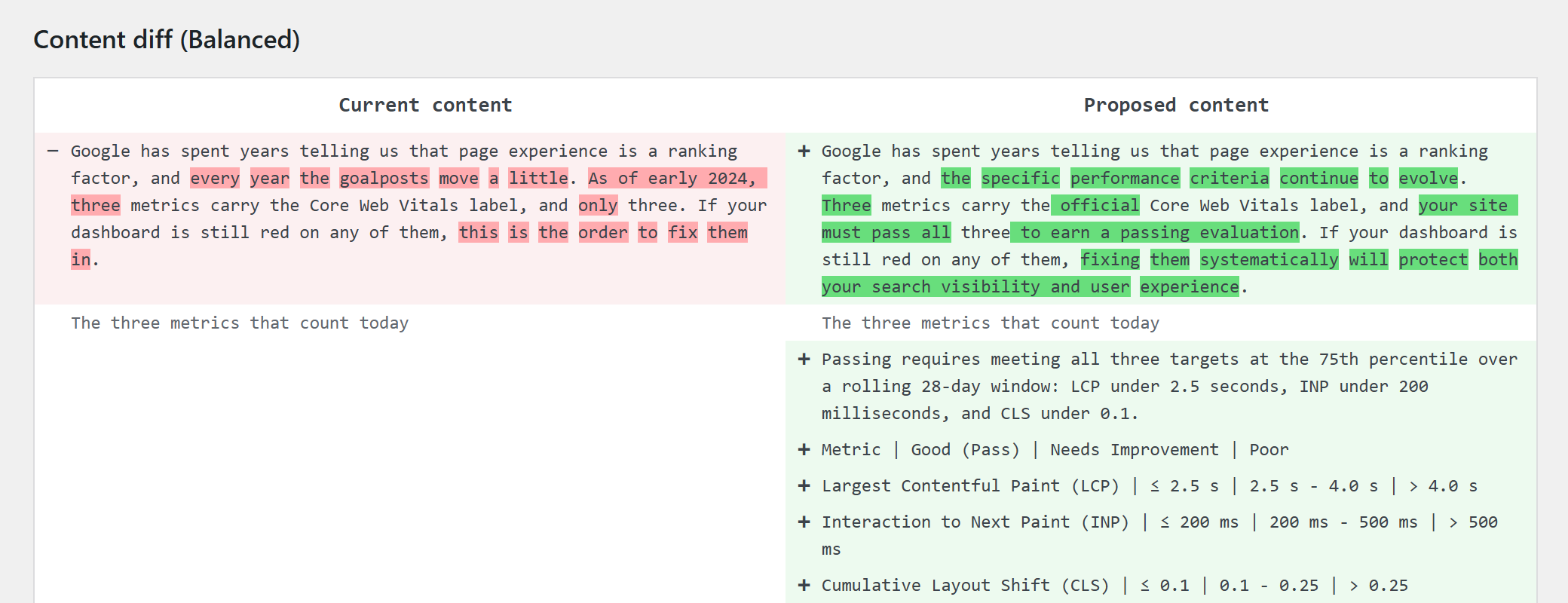
Every refresh lands in the review queue with a side-by-side diff: the paragraph as it was on the left, the paragraph as it would be on the right, change by change. You approve, or you reject, and the post stays exactly as it is until you do. Rejecting leaves the post untouched; the run that produced it is already paid for. When a refresh finishes while you are somewhere else in the admin, a notice says so: with one job waiting it opens that diff directly, with several it opens the queue.
After publication there is a second net. Restore puts the post back field by field: the text, the publish date the refresh moved, and the SEO title and description it wrote. A confirmation screen names what will be reverted before you commit to it. Your own work is never overwritten: a date or SEO field you changed by hand since is left alone, and if you have edited the text itself, Restore declines and leaves the choice of version to you. Underneath all of that, with revisions turned on, the native WordPress revision history also keeps the version from before the refresh when you update an old post in the classic or block editor or Divi. An Elementor or SeedProd layout is not versioned there: on those builders, Restore is the way back. The restore video undoes a real refresh in under two minutes.
What a refresh costs on a real backlog
One Balanced refresh of a post of about 1,200 words, live web research and fact-check included, costs $0.09 on Gemini 3.8 Flash and $0.81 on Claude Sonnet 5.5, the dearest model in the catalogue.
| Model | Estimated cost for a 1,200-word post at the Balanced level |
|---|---|
| Gemini 3.8 Flash | $0.09 |
| Claude Sonnet 5.5 | $0.81 |
Those are conservative token estimates calibrated on real pipeline runs, not a list price. You are billed by your provider, on your own API key, for actual usage, with no credit counter in between and no markup from us. Which model you pick is the cheapest decision on this page, and the plugin shows you the estimate before a refresh you confirm from the editor, the posts list or Content health.

That is what makes it possible to budget before you update old blog posts at all. Multiply the estimate by the number of posts your sorting actually selected and you know the bill before you spend anything, which is a very different exercise from wondering what a bulk refresh across thousands of posts might do to your card. And it is only worth doing because the sorting came first: the same money spread at random buys far less. Cost per article by model and by length gets a page to itself: what an AI refresh costs. The license side, which is separate, is on the pricing page.
The link most sites never place: from old posts to new ones
Almost every site links new posts back to old ones, and almost none does the reverse. That is the gap. An old post that still ranks is the best real estate you own for pointing at what you have published since, and it is sitting there unused.
Three moves, and none of them needs a tool. List everything you have published since this post was last touched. Drop the link into the paragraph that already talks about that subject, not into a block of related links at the bottom where nobody clicks. Check that the anchor describes the target, so both the reader and the crawler know what they are getting.
On a backlog of a few thousand posts this reverse internal linking is usually the largest single pile of value nobody has collected, and it takes minutes per article. If you want it partly automated, Link Whisper does this kind of suggestion. Doing it by hand while you update old blog posts costs nothing extra.
After the update: when to check, and when to come back
Once the update is live, ask Search Console to recrawl the URL. It guarantees nothing; it is simply the fastest way to tell Google the page is not what it was, and it takes ten seconds.
Then watch, in this order: impressions first, clicks second. Impressions move before clicks do, and they are the same signal that told you to update an old post in the first place. Resist reading a verdict into the first few days.
Our own measurement on a real site is running and unfinished, so we are not going to give you a number. The general evidence is worth its own page: does updating old content help SEO. So is the question of when to come back to a post: how often to update posts.
Tools that do the sorting and the rewriting for you
Two families do this work. Platforms that sit outside your site and talk to it over an API, which suits teams running several sites on several stacks. And plugins that live inside WordPress, which see every published post, including the ones analytics never reports.
Which family fits depends on where your content lives, who approves the changes, and how many sites you are responsible for. Nothing is ranked here; each of these four pages takes one part of the question: content refresh tools, WordPress content refresh plugins, Unstale vs Revive.so, Unstale vs RevivePress.
Frequently asked questions about updating old WordPress posts
Which date should readers see after an update, the original or the new one?
Both, clearly separated. Google's guidance of 2019-03-11 says that a significant update should also update the visible date, and that showing the original date beside the updated one is fine as long as readers can tell them apart. Detail: changing the publish date.
Will updating a post lose the backlinks pointing to it?
No, as long as the URL does not change. A backlink points at an address, not at a version of the text, so rewriting the body leaves every anchor and its equity in place. If the address must change, a permanent 301 carries them across.
How long does it take to see an effect after updating a post?
For any change to a site, Google's SEO Starter Guide gives a range from a few hours to several months, and says "you likely want to wait a few weeks" before judging the result. For a refresh, that clock starts at the recrawl: ask for one, then watch impressions in Search Console, then clicks, then average position, in that order. Our own measurement on a real site is unfinished, so we add no delay of our own.
Should I delete old posts that get no traffic?
Not automatically. A post with no clicks can still be relevant, in which case consolidate it into the stronger post on the same query, or keep it to link forward from. Otherwise noindex it and read the rest one by one: prune or refresh.
Can I update thousands of posts without spending a year on it?
Yes, if you sort first. You do not update old blog posts at that scale by working faster, you do it by working on fewer. The Content health screen queues up to 50 posts in one go in the free plugin, to run now or on a date you set; wider batches and recurring automation sit in Unstale Pro, on the pricing page. The bulk refresh video queues 100 posts in one go.
Can I let AI touch a post that already ranks?
Yes, if the rewrite still delivers what the title promises and gets its facts right, by hand or with AI. Google's guidance judges the content, not how it was produced, so read the diff before the new version goes live. More: will AI rewriting hurt rankings.
What if the refreshed version is worse than the original?
You see it before anyone else does. By default, every refresh waits in the review queue with its diff, and nothing publishes until you approve. After publication, Restore puts the post back field by field. On the classic or block editor and Divi, with revisions turned on, the revision history WordPress keeps when you update an old post is a third way back; an Elementor or SeedProd layout is not in it.
Start with your stalest post
You do not need a plan for the whole backlog to begin. Pick your stalest post, run one refresh, and read the diff before anything goes live. The four levels of change are explained in the docs, and nothing is published until you approve it.
Quoted material from Google Search Central is used under the Creative Commons Attribution 4.0 License. Sources: John Mueller, "Help Google Search know the best date for your web page", Google Search Central Blog, 2019-03-11; "Influence your byline dates in Google Search" and "Search Engine Optimization (SEO) Starter Guide", Google Search Central documentation.