How to Rewrite Old Blog Posts With AI, in Place: Pick the Level, Check the Facts, Read the Diff
To rewrite old blog posts with AI and keep what they have already earned, refresh them in place: keep the URL, choose how much the model may change, let it check the figures against the live web, and read the changes in a diff before you approve them.
On 2026-09-02, nine of the ten related searches Google.com suggested in the US for this query were for article rewriters and paraphrasers, and Google answered it with an AI Overview drawing on five sources before the first organic result. A paraphraser changes the words of a post. An old post usually needs its facts changed.
In place or somewhere else: the choice that decides what an old post keeps
Where the new text lives decides what the old post keeps: its address, the links pointing at it, and a way back.
| Approach | Where the new text lives | The old URL | Figures checked against the live web | You review the changes first | Way back |
|---|---|---|---|---|---|
| Repurpose it into new formats | A carousel, a script, an email | Untouched, and just as stale | Only if you do it | Not applicable | Nothing to undo |
| Paste it into a chat assistant | Back in the editor, by hand | Kept, if you paste carefully | Depends on the assistant and on you | Only if you compare the two yourself | WordPress revisions |
| Refresh it in place, with review | The same post | Kept | The main claims before the rewrite, the new figures after, with the sources found | A side-by-side diff, by default | Restore, then revisions |
Repurpose old blog posts into a carousel or an email and you gain new material, but the page that ranks keeps its outdated figures, on the URL readers still land on.
A chat assistant lets you keep the same URL if the result goes back into the post it came from, but the trip back is yours: headings, links, embeds and shortcodes to check by hand, and to rebuild when they break. A paraphraser only rewords, and the facts stay stale.
The third row is what Unstale does when you rewrite an old post with AI; the sections below show what each cell rests on.
Four levels of change, from a light pass to a new outline
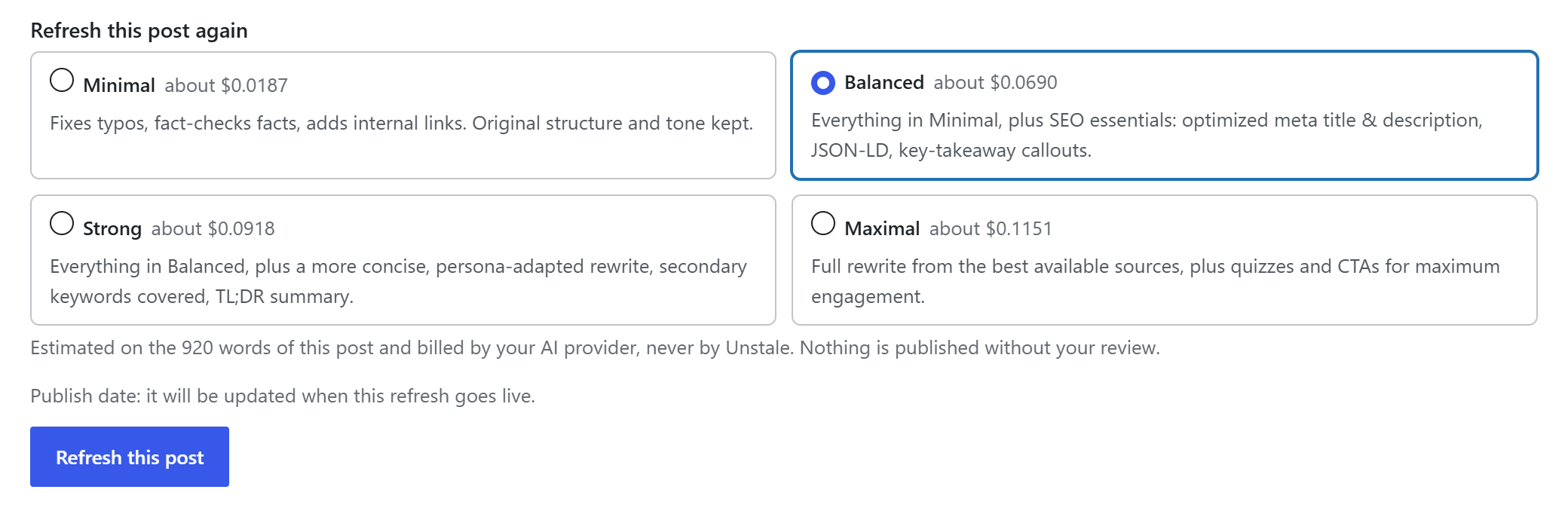
When you rewrite old blog posts, the level sets how far the model may go and what it is told to leave alone.
What each level may change, and what it is told to keep
The last column holds instructions to the model, not locks in the code.
| Level | What it may change | What it is told to keep |
|---|---|---|
| Minimal | Typos, outdated facts, internal links | Your structure, headings, tone and wording |
| Balanced | Also the copy for today's search intent, short missing passages, lists and tables where prose hides them, meta title and description, structured data, key-takeaway boxes | Your heading structure, tone, and the claims the fact-check confirmed |
| Strong (Pro) | Also tighter copy for the reader it targets, the secondary queries covered, a TL;DR, and calls to action and a short quiz when the post allows them | Your heading structure, your sections, and the way you address the reader |
| Maximal (Pro) | Also the outline itself: sections reordered, merged, split, added or dropped | The promise of the title and the facts worth keeping |
At every level, the model is told to bring a year that only dates the text up to the current year, and to leave the year of an event alone.
A 1,200-word post runs $0.02 to $0.14 at Minimal and $0.09 to $0.81 at Balanced, from the cheapest model in the catalogue to the dearest. Those estimates are set on the high side from real runs with Anthropic and Google models, your provider bills actual usage, and the block under the editor shows the estimate for your own post and model on each level before you run it. Other lengths and models get their own page: what it costs per article. The steps each level runs are in the docs.
Strong and Maximal, when the writing or the outline is the problem
An AI rewrite at Strong is told to rework the prose for the post's reader and to keep its headings and sections in order. Maximal alone is told to rebuild the outline: it fits a post whose topic holds but whose outline no longer matches what searchers expect, not one that ranks. Both levels come with Unstale Pro. The Strong and Maximal video runs both on the same 2023 post, and shows each version in review before one goes live.
Which level for which post
A post that still ranks gets Minimal; one that is sliding gets Balanced. Strong waits until the writing is the problem, Maximal until you have decided the outline is. Sorting old blog posts into those groups comes first, in the main guide: refresh old WordPress posts. When a rewrite costs positions, look first at whether the post still delivers what its title promises and whether its facts held, with or without AI. More on that risk: will AI rewriting hurt rankings.
What the AI checks against the live web, and what it cannot
It checks the most important claims in your post before it rewrites anything, then checks the new figures the rewrite put in the text, and lists each correction with the source it found in the Unstale block under the editor, not in the post.
Before the rewrite: the main claims already in the post
Before an AI rewrite, the fact-check reads the original post and is told to search the web for its factual claims (numbers, prices, dates, versions, feature lists, statistics, names), official sources first, prioritizing four to twelve of them, not the whole post. Each comes back correct, outdated or unverifiable, with a link to the source when one was found, and the rewrite is told to apply only the outdated corrections. The searches use your connected provider's web search tool, requested through WordPress; Unstale has no search engine of its own. From Balanced up, a research step is also told to study what ranks today for the post's main keyword.
After the rewrite: the new figures in the text
Outdated figures are often the reason to refresh old posts at all, and a figure the rewrite adds deserves the same scrutiny. A second check takes the passages of the post body holding a figure the original lacked, up to twelve passages and roughly 400 words, and searches again. When no figure was added, it calls no model, costs nothing, and the block under the editor says so. The post title, meta fields and structured data skip this check.
What no source confirms
An original claim no source confirms is counted in the Unstale block, not corrected. A new figure no source confirms is flagged "No source confirms this.", and one found outdated is flagged with a correction. Neither is changed for you: reject the refresh, or approve it and fix the sentence in the editor. One limit matters on old blog posts full of numbers: a new figure whose value already appeared elsewhere in the original is not sent to this second check. Your provider prices the searches: the estimate counts them, the cost logged afterwards does not, because the provider plugins did not report them as of 2026-09-05. Rates are in the docs.

What the rewrite leaves alone, and what changes when it goes live
When you rewrite old blog posts in place, you keep the same URL and five other things, within these limits:
- The URL and the slug. Publishing writes the content, never the address.
- The post title, except a year that only dated it, from Balanced up.
- Your shortcodes, in the block or classic editor and in SeedProd. The model never sees them, and if one goes missing, nothing is published.
- Your Elementor, Divi or SeedProd layout. The text is taken from the builder's own data, rewritten and put back where it was.
- A way back. In the block or classic editor and on Divi, the version from before the refresh is saved as a WordPress revision when revisions are on. On Elementor and SeedProd it sits in Unstale's own snapshot, and Restore brings it back.
- Text you edited meanwhile. If the post content changed after the refresh started, publishing refuses.
Three things do change. First, the publish date. On default settings, when a refresh that changed the text goes live, the post's date becomes that moment minus a random offset of up to an hour, and the post rises among the newest on the blog. The plugin stores the original date, and prints it above the post next to the updated one if you tick "Show readers the original publish date on refreshed posts", off by default. When the new date would change a dated address, the date stays put, and the block under the editor says what will happen to it before you run anything. To keep the original date, untick "Update the publish date when a refreshed post goes live" under Republication in the Unstale settings. Whether to move it is its own question: changing the publish date.
Second, from Balanced up, the refresh replaces the meta title and meta description, in your SEO plugin's fields when one is active, even values edited while it waited for review. Third, publishing strips from the rewritten text any HTML that WordPress does not allow in a post, and by default an iframe the model added from a host other than YouTube, Vimeo and Dailymotion; the text diff does not show those removals. An embed, script or form already in the post must come back exactly, or publishing refuses. Builder and SEO plugin support is in the docs.
Approve, reject or restore: what each choice actually does
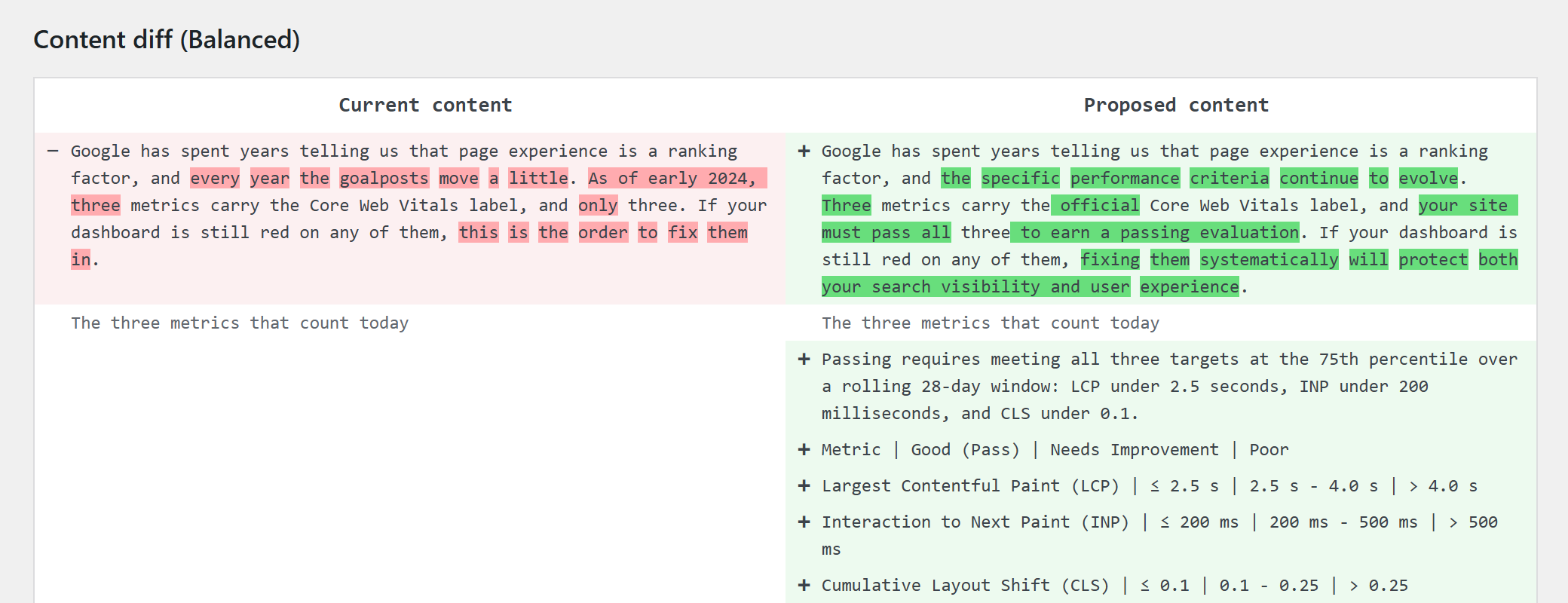
By default every rewrite waits for a person: you read a side-by-side diff, then approve it or reject it, and the latest published refresh can be undone from the editor as long as the post has not been edited or refreshed again since.
Approve is where you read the changes before they go live, the part of rewriting old posts that stays yours. The review queue shows current and proposed content side by side, below whatever else the refresh proposes: post title, meta fields, structured data, internal links. The diff compares rendered text: reworded sentences, new or moved paragraphs and prose turned into a list show; a heading level changed with the same words, bold text or an embed the model added do not. An original embed that goes missing makes publishing refuse. Approving or rejecting takes Editor or Administrator rights by default, and the proposal cannot be edited in the queue. That human in the loop is the default, not a lock: automatic publishing, off until you turn it on, skips this step.
Reject leaves the post as it was and keeps the proposal on record. It does not cancel the bill: your provider charges each step once it runs, and Unstale's journal lists the rejected refresh with its cost.
Restore is a link, "Restore the previous version", in the Unstale block under the editor, shown while the published refresh is the post's latest; a later refresh, even rejected or failed, removes it. It opens a confirmation screen listing what comes back: the text, plus the publish date and the SEO fields the refresh changed, unless someone changed them since. There is no time limit, but once the post content differs from what Unstale published, Restore refuses and points you to the WordPress revision history. Outside Elementor and SeedProd, it also needs revisions turned on. The restore video shows each step on a real post.
What to look at before approving is in a refresh checklist.
Questions people ask before rewriting old posts with AI
Can I rewrite old blog posts with AI for free?
The plugin is free on wordpress.org and runs Minimal and Balanced. The AI usage is another matter: your provider bills each run to the account connected on your site, and Unstale bills none of it. Strong and Maximal require Unstale Pro and an active license, priced on the pricing page.
Will the AI rewrite my whole post?
Only Maximal is told to rebuild the outline. Strong is told to rewrite the prose end to end but to keep headings and sections, and Minimal and Balanced are told to keep the heading structure. Those are instructions, not code locks on the outline, and the diff shows how the wording changed.
Which level should I use on a post that still ranks?
Minimal. It leaves the post title and SEO fields alone and is told to apply the fact-check's outdated corrections while keeping structure, headings and tone. The publish date still moves by default at every level when the refresh changed the text, unless you turn that off in the Unstale settings. Why a rewrite can lose positions: will AI rewriting hurt rankings.
Does my content or my API key pass through Unstale?
No. WordPress 7.0 routes each request to the provider you connected in Settings > Connectors, and WordPress keeps the key, not Unstale. Beyond those requests, Unstale's only outbound calls carry none of your post's text: the model catalogue, a YouTube availability check that sends only the public addresses of the YouTube videos the post embeds, and, in Pro, the license and updates. See the Make WordPress Core note of 2026-03-24 and our privacy page.
What happens if I edit the post while the rewrite waits for review?
If you change the post text, your version stays: publishing refuses and asks for a new refresh, and the review queue warns you first. A post title you changed is not overwritten either. From Balanced up, though, a meta title or meta description you changed meanwhile is replaced on publication.
Try it on one post that has aged
Pick one post whose figures have aged, run it at Minimal, and read the diff before you decide anything else. The levels are compared in full in the docs.